 Documentation
Zigbee setup and troubleshooting
Description
To use Zigbee devices with a Wiren Board controller, you need:
- Expansion module WBE2R-R-ZIGBEE v.2 (WBE2R-R-ZIGBEE v.1) or any Zigbee USB stick.
- Additional software:
- zigbee2mqtt — a bridge for controlling Zigbee devices through MQTT, supported devices.
- wb-mqtt-zigbee — converts zigbee2mqtt topics to Wiren Board MQTT Conventions.
Installation instructions are provided below.
Copy commands from these instructions, paste them into the controller console using Shift+Insert and run them by pressing Enter. If an error occurs, read the output carefully for instructions and hints.
Installing and configuring zigbee2mqtt
Installation procedure
The zigbee2mqtt package in the stable release may lag behind the upstream version. The latest version is always available in the testing release.
We recommend installing a prebuilt package from our repository. Two packages are available:
- zigbee2mqtt — the latest version; recommended.
- zigbee2mqtt-1.18.1 — for older WBE2R-R-ZIGBEE v.1 adapters manufactured before January 2022. Revision table.
To install the latest version, run:
apt update && apt install zigbee2mqtt
To install version 1.18.1, required for Zigbee v1 revisions v1.1A–v1.2D, run:
apt update && apt install zigbee2mqtt-1.18.1
To install version 2.1.1 for Zigbee v1 revisions v1.2D/2, v1.2E and v1.2F, run:
apt update && apt install zigbee2mqtt-2.1.1
Alternatively, build from source following the instructions.
Next, configure the bridge; see Configuration.
Configuring automatic startup
After package installation, zigbee2mqtt starts automatically when the controller boots. Use these commands to disable or enable automatic startup:
systemctl disable zigbee2mqtt
systemctl enable zigbee2mqtt
Configuration
If you use the expansion module WBE2R-R-ZIGBEE, make sure the correct module is selected in the web interface Settings → Configs → Hardware Modules Configuration.
Port name:
- when using the expansion module WBE2R-R-ZIGBEE the port is named
/dev/ttyMODx, where x is the port number; - when using a USB stick, the port is named
/dev/ttyUSBx, where x is the port number, starting at zero.
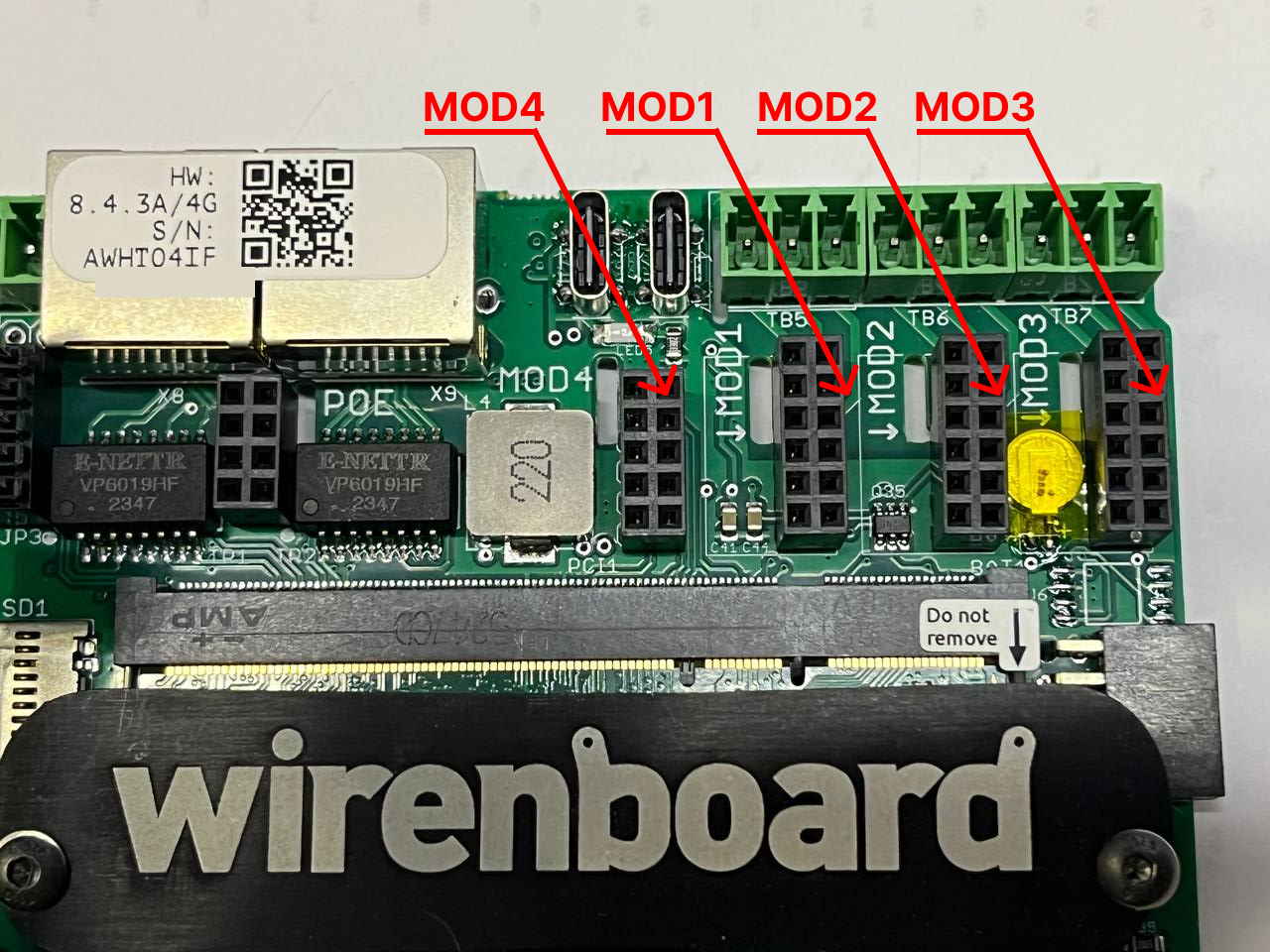
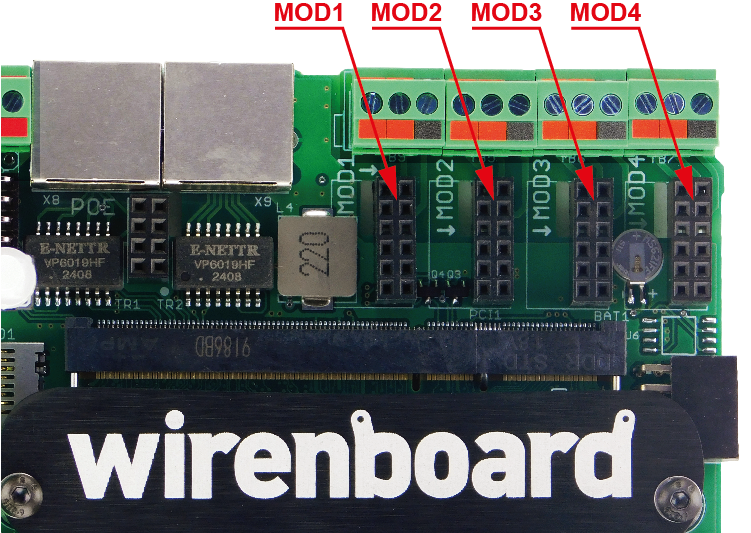
Configuration:
- Open the configuration file for editing (complete parameter reference in English):
nano /mnt/data/root/zigbee2mqtt/data/configuration.yaml- The default configuration file looks like this:
homeassistant: false
permit_join: false
mqtt:
  base_topic: zigbee2mqtt
  server: 'mqtt://localhost'
serial:
  port: /dev/ttyMOD4
  adapter: zstack
advanced:
  rtscts: false
  last_seen: epoch
  channel: 11
  pan_id: GENERATE
  network_key: GENERATE
ota:
    image_block_response_delay: 50
    default_maximum_data_size: 60
- Change the required parameters:
- The parameter port specify the connector in which the module is physically installed. If the correct port is already specified, leave the file unchanged.
- After the bridge starts for the first time, values replace GENERATE; do not change them. If you change them, update or delete the backup.
- Click Ctrl+S to save changes, Ctrl+X — to exit the editor.
- Restart the service
zigbee2mqtt:systemctl restart zigbee2mqtt
You can now install the converter, and Zigbee devices will appear on the Devices tab in the standard controller web interface.
Possible issues:
- If you select the wrong connector number for the Zigbee expansion module in the web interface, the log will show this error: z2m: Error: Error: Input/output error setting custom baud rate of 115200
Example log:
# journalctl -u zigbee2mqtt --no-pager -n 30

May 12 13:53:25 wirenboard-AQLNJER2 systemd[1]: Started zigbee2mqtt.
May 12 13:53:25 wirenboard-AQLNJER2 npm[27834]: > zigbee2mqtt@2.1.1 start
May 12 13:53:25 wirenboard-AQLNJER2 npm[27834]: > node index.js
May 12 13:53:26 wirenboard-AQLNJER2 npm[27846]: Starting Zigbee2MQTT without watchdog.
May 12 13:53:32 wirenboard-AQLNJER2 npm[27846]: [2025-05-12 13:53:32] info:         z2m: Logging to console, file (filename: log.log)
May 12 13:53:32 wirenboard-AQLNJER2 npm[27846]: [2025-05-12 13:53:32] info:         z2m: Starting Zigbee2MQTT version 2.1.1 (commit #unknown)
May 12 13:53:32 wirenboard-AQLNJER2 npm[27846]: [2025-05-12 13:53:32] info:         z2m: Starting zigbee-herdsman (3.2.5)
May 12 13:53:32 wirenboard-AQLNJER2 npm[27846]: [2025-05-12 13:53:32] info:         zh:zstack:znp: Opening SerialPort with {"path":"/dev/ttyMOD3","baudRate":115200,"rtscts":false,"autoOpen":false}
May 12 13:53:32 wirenboard-AQLNJER2 npm[27846]: [2025-05-12 13:53:32] error:         z2m: Error while starting zigbee-herdsman
May 12 13:53:32 wirenboard-AQLNJER2 npm[27846]: [2025-05-12 13:53:32] error:         z2m: Failed to start zigbee-herdsman
May 12 13:53:32 wirenboard-AQLNJER2 npm[27846]: [2025-05-12 13:53:32] error:         z2m: Check https://www.zigbee2mqtt.io/guide/installation/20_zigbee2mqtt-fails-to-start_crashes-runtime.html for possible solutions
May 12 13:53:32 wirenboard-AQLNJER2 npm[27846]: [2025-05-12 13:53:32] error:         z2m: Exiting...
May 12 13:53:32 wirenboard-AQLNJER2 npm[27846]: [2025-05-12 13:53:32] error:         z2m: Error: Error: Input/output error setting custom baud rate of 115200
May 12 13:53:32 wirenboard-AQLNJER2 systemd[1]: zigbee2mqtt.service: Main process exited, code=exited, status=1/FAILURE
May 12 13:53:32 wirenboard-AQLNJER2 systemd[1]: zigbee2mqtt.service: Failed with result 'exit-code'.
May 12 13:53:32 wirenboard-AQLNJER2 systemd[1]: zigbee2mqtt.service: Consumed 10.578s CPU time.
May 12 13:54:22 wirenboard-AQLNJER2 systemd[1]: Stopped zigbee2mqtt.
May 12 13:54:22 wirenboard-AQLNJER2 systemd[1]: zigbee2mqtt.service: Consumed 10.578s CPU time.
Web interface (frontend)
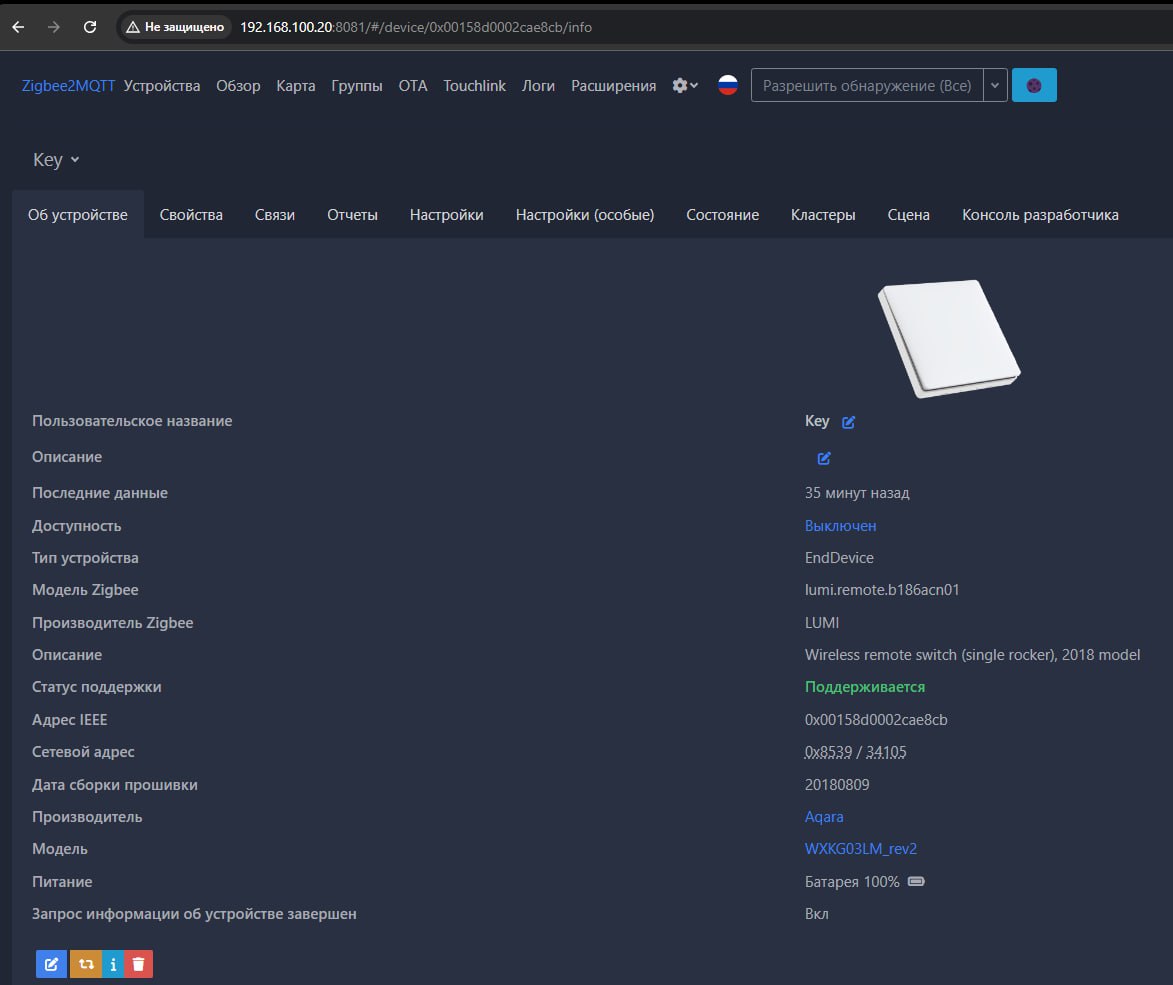
The zigbee2mqtt web interface runs on a separate port and may pose a security risk — do not enable it if unused: devices can be added and removed through our converter.
Available in release testing Access to the web interface can be protected by controller user authentication. See Third-party services in the Wiren Board web interface.
If you need the native zigbee2mqtt web interface, enable it in the settings file:
- Open the file
configuration.yamlfor editing:nano /mnt/data/root/zigbee2mqtt/data/configuration.yaml
- Add this block:
frontend:
  enabled: true
  port: 8081
  host: 0.0.0.0
- Save and close the file.
- Restart the service
zigbee2mqtt:systemctl restart zigbee2mqtt
The zigbee2mqtt bridge web interface will be available at http://wb-ip-address:PORT. For example, if the controller IP address is 192.168.42.1and the configured port is 8081, the web interface will be available at http://192.168.42.1:8081.
Cloud access
The zigbee2mqtt web interface can also be accessed outside the local network. If the controller is connected to Wiren Board Cloud, click Services on the controller page and add Zigbee2MQTT. A button will appear that opens the interface from any device signed into your cloud account.
Checking status
There are two ways to check whether z2m started successfully:
1) Briefly check its operating status.
The following is a normal output with no errors:
# systemctl status zigbee2mqtt
● zigbee2mqtt.service - zigbee2mqtt
     Loaded: loaded (/lib/systemd/system/zigbee2mqtt.service; enabled; vendor preset: enabled)
     Active: active (running) since Thu 2025-03-06 10:23:02 UTC; 1s ago
   Main PID: 630240 (npm start)
      Tasks: 26 (limit: 2340)
     Memory: 34.0M
        CPU: 2.087s
     CGroup: /system.slice/zigbee2mqtt.service
             ├─630240 npm start
             ├─630262 sh -c node index.js
             └─630263 node index.js

Mar 06 10:23:02 wirenboard-AQLNJER2 systemd[1]: Started zigbee2mqtt.
Mar 06 10:23:03 wirenboard-AQLNJER2 npm[630240]: > zigbee2mqtt@2.1.1 start
Mar 06 10:23:03 wirenboard-AQLNJER2 npm[630240]: > node index.js
Note the line Active: active (running) since ... and the absence of errors or warnings.
If you specified the wrong module connector number in the previous step, the output will look similar to this:
# systemctl status zigbee2mqtt
● zigbee2mqtt.service - zigbee2mqtt
     Loaded: loaded (/lib/systemd/system/zigbee2mqtt.service; enabled; vendor preset: enabled)
     Active: activating (auto-restart) (Result: exit-code) since Thu 2025-03-06 10:19:33 UTC; 5s ago
   Main PID: 628249 (code=exited, status=1/FAILURE)
      Tasks: 0 (limit: 2340)
     Memory: 0B
        CPU: 0
     CGroup: /system.slice/zigbee2mqtt.service
The PID line above indicates an error: Main PID: 628249 (code=exited, status=1/FAILURE).
2) Examine the zigbee2mqtt log in detail.
# journalctl -u zigbee2mqtt --no-pager -n 30
-- Journal begins at Tue 2025-03-04 16:14:09 UTC. --
Mar 06 14:17:00 wirenboard-AQLNJER2 npm[27126]: [2025-03-06 14:17:00] error:         z2m: Exiting...
Mar 06 14:17:01 wirenboard-AQLNJER2 npm[27126]: [2025-03-06 14:17:01] error:         z2m: Error: Failed to connect to the adapter (Error: SRSP - SYS - ping after 6000ms)
Mar 06 14:17:01 wirenboard-AQLNJER2 npm[27126]:     at ZStackAdapter.start (/mnt/data/root/zigbee2mqtt/node_modules/.pnpm/zigbee-herdsman@3.2.5/node_modules/zigbee-herdsman/src/adapter/z-stack/adapter/zStackAdapter.ts:113:27)
Mar 06 14:17:01 wirenboard-AQLNJER2 npm[27126]:     at Controller.start (/mnt/data/root/zigbee2mqtt/node_modules/.pnpm/zigbee-herdsman@3.2.5/node_modules/zigbee-herdsman/src/controller/controller.ts:136:29)
Mar 06 14:17:01 wirenboard-AQLNJER2 npm[27126]:     at Zigbee.start (/mnt/data/root/zigbee2mqtt/lib/zigbee.ts:69:27)
Mar 06 14:17:01 wirenboard-AQLNJER2 npm[27126]:     at Controller.start (/mnt/data/root/zigbee2mqtt/lib/controller.ts:142:13)
Mar 06 14:17:01 wirenboard-AQLNJER2 npm[27126]:     at start (/mnt/data/root/zigbee2mqtt/index.js:161:5)
Mar 06 14:17:01 wirenboard-AQLNJER2 systemd[1]: zigbee2mqtt.service: Main process exited, code=exited, status=1/FAILURE
Mar 06 14:17:01 wirenboard-AQLNJER2 systemd[1]: zigbee2mqtt.service: Failed with result 'exit-code'.
Mar 06 14:17:01 wirenboard-AQLNJER2 systemd[1]: zigbee2mqtt.service: Consumed 14.449s CPU time.
Mar 06 14:18:19 wirenboard-AQLNJER2 systemd[1]: Stopped zigbee2mqtt.
...
Startup problems and errors may prevent subsequent service starts. In this case, the following command can reset the errors:
# systemctl reset-failed zigbee2mqtt.service
For example, this may help with the following error after changing the port number in z2m settings:
# systemctl restart zigbee2mqtt
Job for zigbee2mqtt.service failed because the control process exited with error code.
See "systemctl status zigbee2mqtt.service" and "journalctl -xe" for details.
# systemctl reset-failed zigbee2mqtt.service
# systemctl restart zigbee2mqtt
Updating
To update zigbee2mqtt to the latest version, update the controller software following the instructions. All settings and paired devices will be preserved.
If you have an older WBE2R-R-ZIGBEE v.1adapter manufactured before January 2022, the new version will not work. There are three options:
- Flash the older adapter with newer firmware, instructions.
- Install the package version compatible with these adapters:
apt install zigbee2mqtt-1.18.1
- Replace the adapter with WBE2R-R-ZIGBEE v.2 or use a supported USB stick.
Setting transmit power
The default transmit power is 9 dBm. To increase it (available values: 0…20 dBm):
- Open the file
configuration.yamlfor editing:nano /mnt/data/root/zigbee2mqtt/data/configuration.yaml
- Add to the block
advanced:advanced: transmit_power: 20
- Save and close the file.
- Restart the service
zigbee2mqtt:systemctl restart zigbee2mqtt
wb-mqtt-zigbee converter
Available since release wb-2606
Description
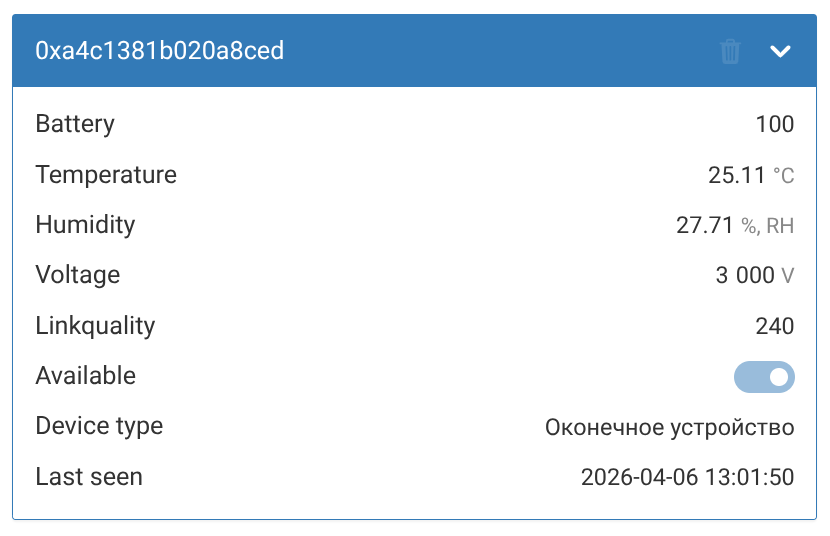
wb-mqtt-zigbee is the new converter that maps zigbee2mqtt data to virtual-device topics. It displays Zigbee devices in the Wiren Board controller web interface and controls them.
The converter translates Zigbee device control names wb-mqtt-zigbee into Russian using its own dictionary. If a control name remains in English, it is not yet in the dictionary. Contact us through the technical support portal, and we will add the translation in a future update.
How it works
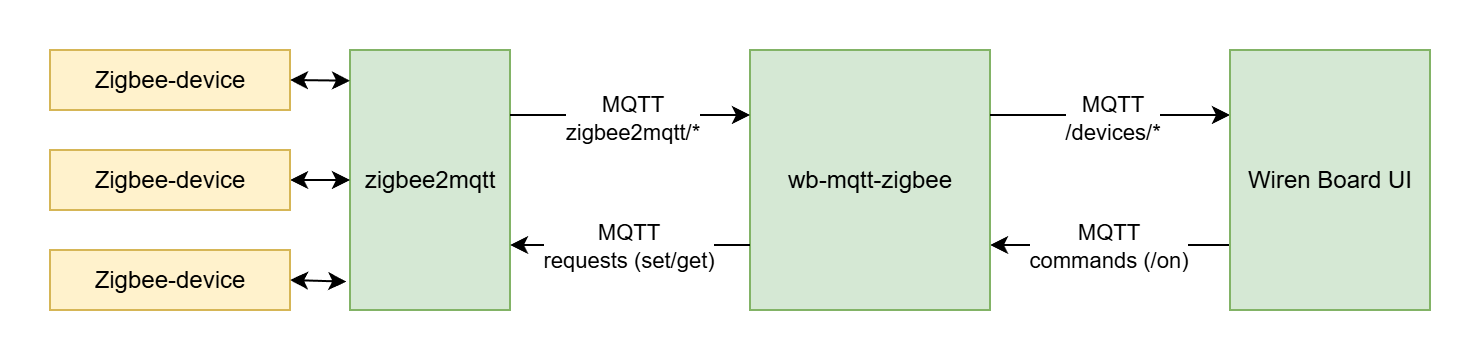
Zigbee2mqtt connects to the Zigbee coordinator, discovers devices and publishes all information to the MQTT broker. The topic namespace is configured in the zigbee2mqtt configuration (/mnt/data/root/zigbee2mqtt/data/configuration.yaml, parameter base_topic), and defaults to zigbee2mqtt. The converter then:
- Subscribes to topics
zigbee2mqtt/and receives bridge status, the device list, logs and events. - Creates virtual WB devices in
/devices/— publishing metadata (/meta) and control values according to WB MQTT Conventions. - Relays commands back: when a user selects a drop-down value, moves a slider or operates a switch in the controller web interface, the service receives a command from
/devices/.../onand publishes the corresponding request tozigbee2mqtt/bridge/request/....
The diagram below shows data flow through the MQTT broker (mosquitto): zigbee2mqtt topics on the left and Wiren Board controller topics on the right. Arrows are bidirectional: device states flow left to right, commands right to left.
Installation
Warning: installing the new converter may break custom scripts wb-rules, especially where rules used the string value ONand now use the Boolean value 1 for a switch. wb-mqtt-zigbee is installed automatically with the package zigbee2mqttif wb-zigbee2mqttwas not already installed. Otherwise, install it with:
apt update && apt install wb-mqtt-zigbee
The standard controller web interface will then show, on the Devices tab, the device Zigbee2MQTT.
Adding devices
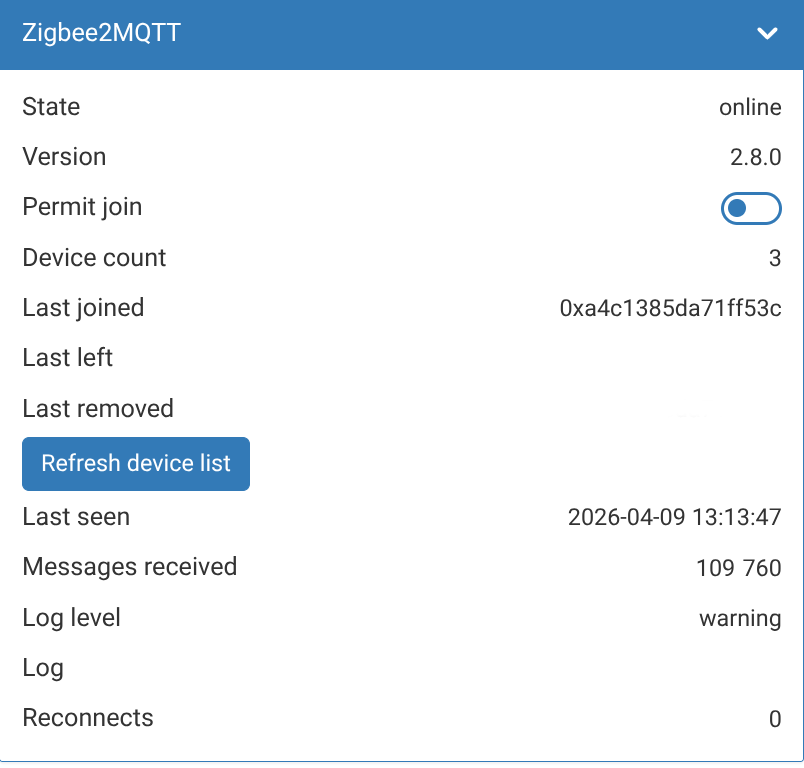
Devices can be added individually or together. To add new devices:
- Open the controller web interface and select the Devices tab.
- Find the Zigbee2MQTT device widget and check its status in the State field. It should read online. If zigbee2mqtt was just installed, wait a couple of minutes.
- Enable the Permit join switch.
- Follow the Zigbee device instructions: typically, hold its pair button for a few seconds and wait for the indicator to flash.
- While adding a device, the Zigbee2MQTT widget's Last joined field displays the device IEEE address (for example 0xa4c1385da71ff53c), and the device count increases by one for every device added.
- Repeat steps 4 and 5 for each Zigbee device.
- Finish adding devices by disabling the Permit join.
Changing friendly_name
friendly_name is a user-defined device name. Keep the default or set your own:
- Open the configuration file for editing:
nano /mnt/data/root/zigbee2mqtt/data/configuration.yaml
- Find, in the section devices your device.
- Change friendly_name.
- Save the configuration file and restart the service:
systemctl restart zigbee2mqtt
- On the Devices tab, a device should appear with the specified name.
- Remove the widget with the old name by clicking the trash icon in its heading.
The new name must be unique for each device, must not contain a slash / and must meet the parameter requirements and Wiren Board MQTT Conventions.
- Changing friendly_name
-
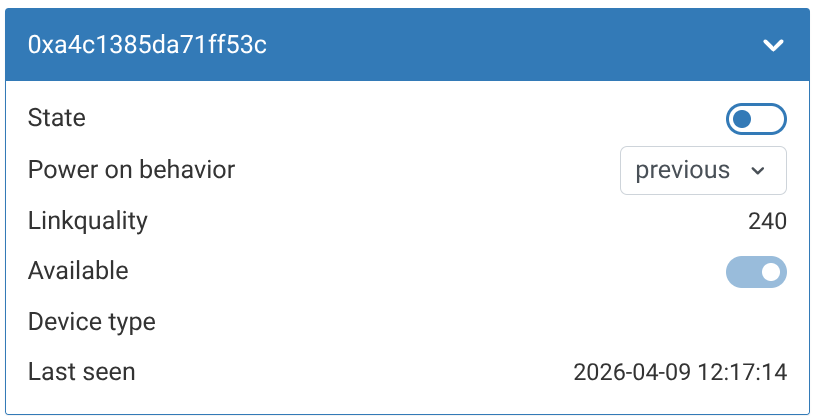 Device widget with friendly_name default
-
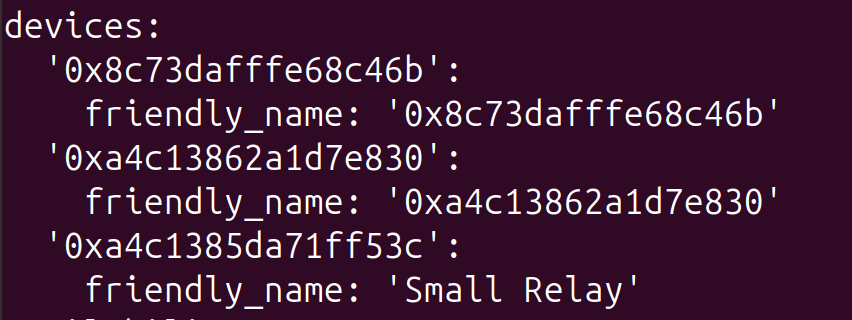 Changing friendly_name in the configuration file
-
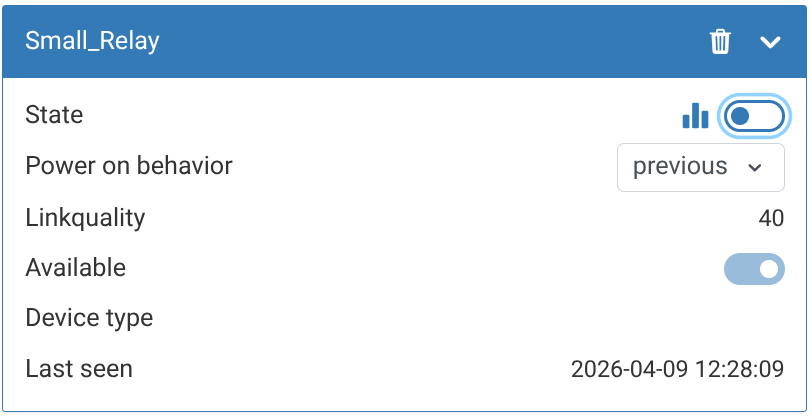 Device widget with the new friendly_name
Controlling a device
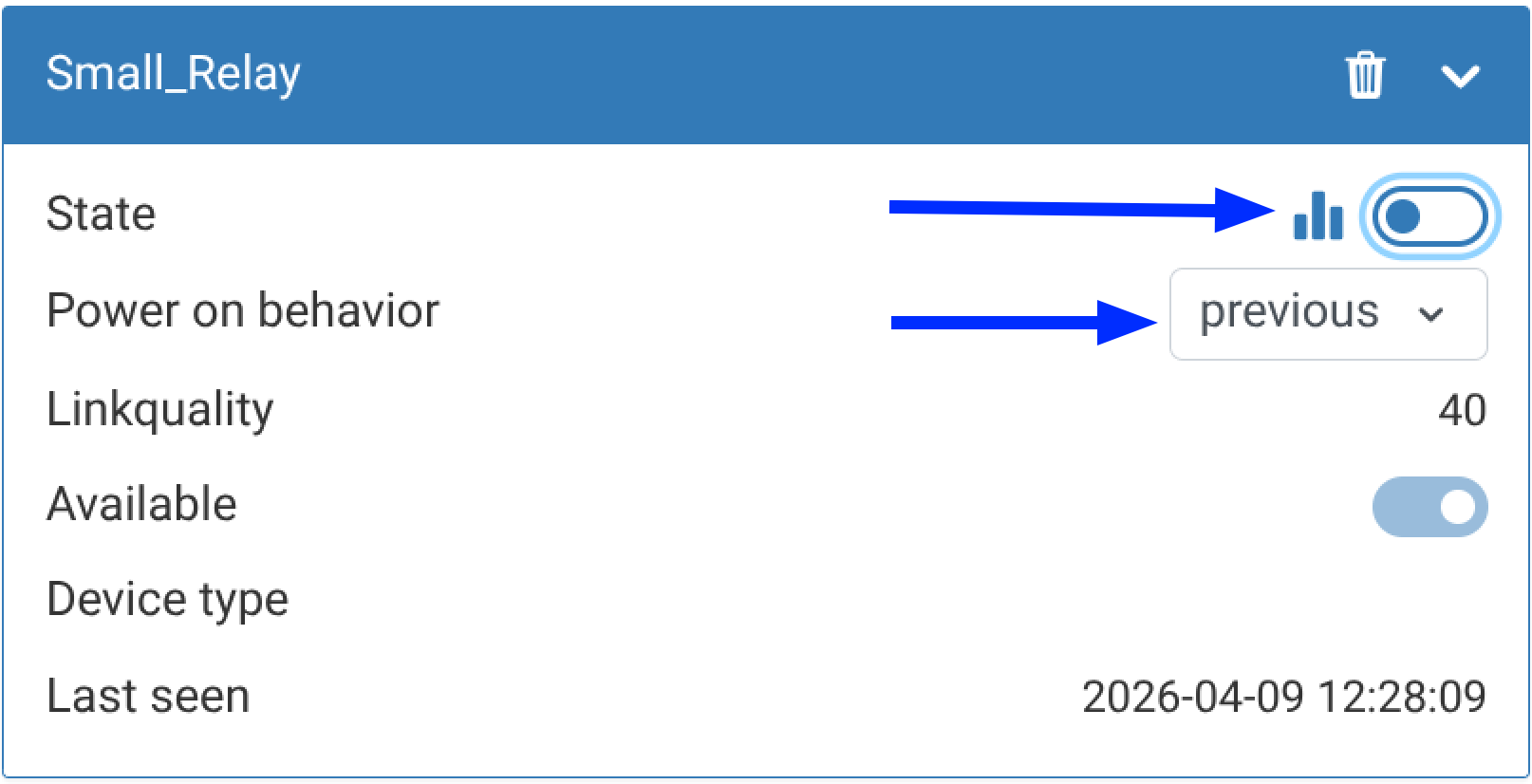
Devices are operated using standard controls: switches or drop-down lists.
Removing devices
- Make sure that, in the device widget Zigbee2MQTT , the switch Permit join is off.
- Unpair the device from the coordinator. This usually requires holding its pairing button for 5 seconds; consult the device documentation.
- Check that, in the device Zigbee2MQTT widget's , the Last removed field shows the name of the device being removed.
- Remove the disconnected Zigbee device widget from the web interface by clicking the trash icon in its heading.
-
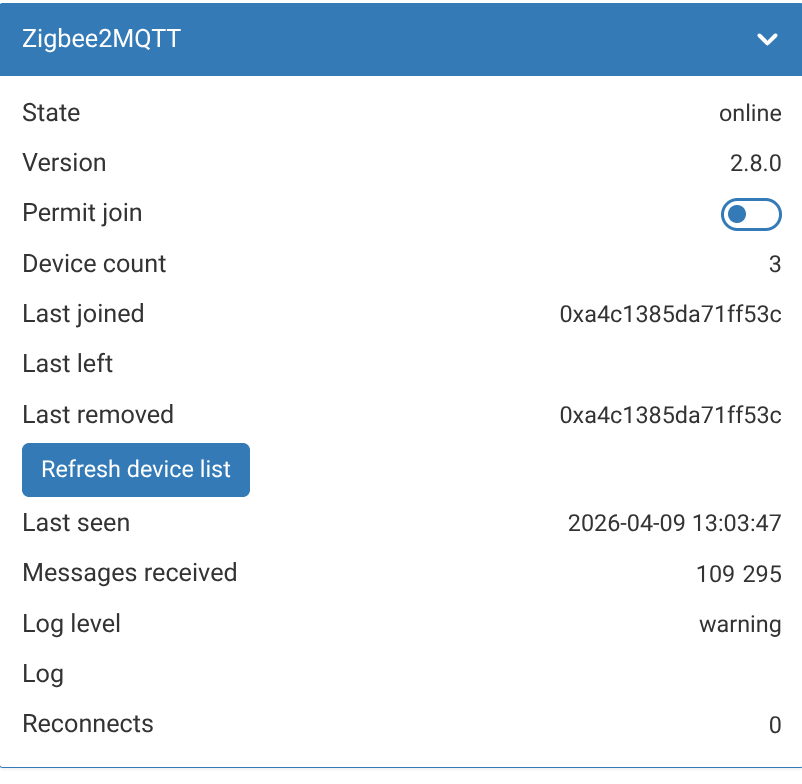 Most recently removed device
-
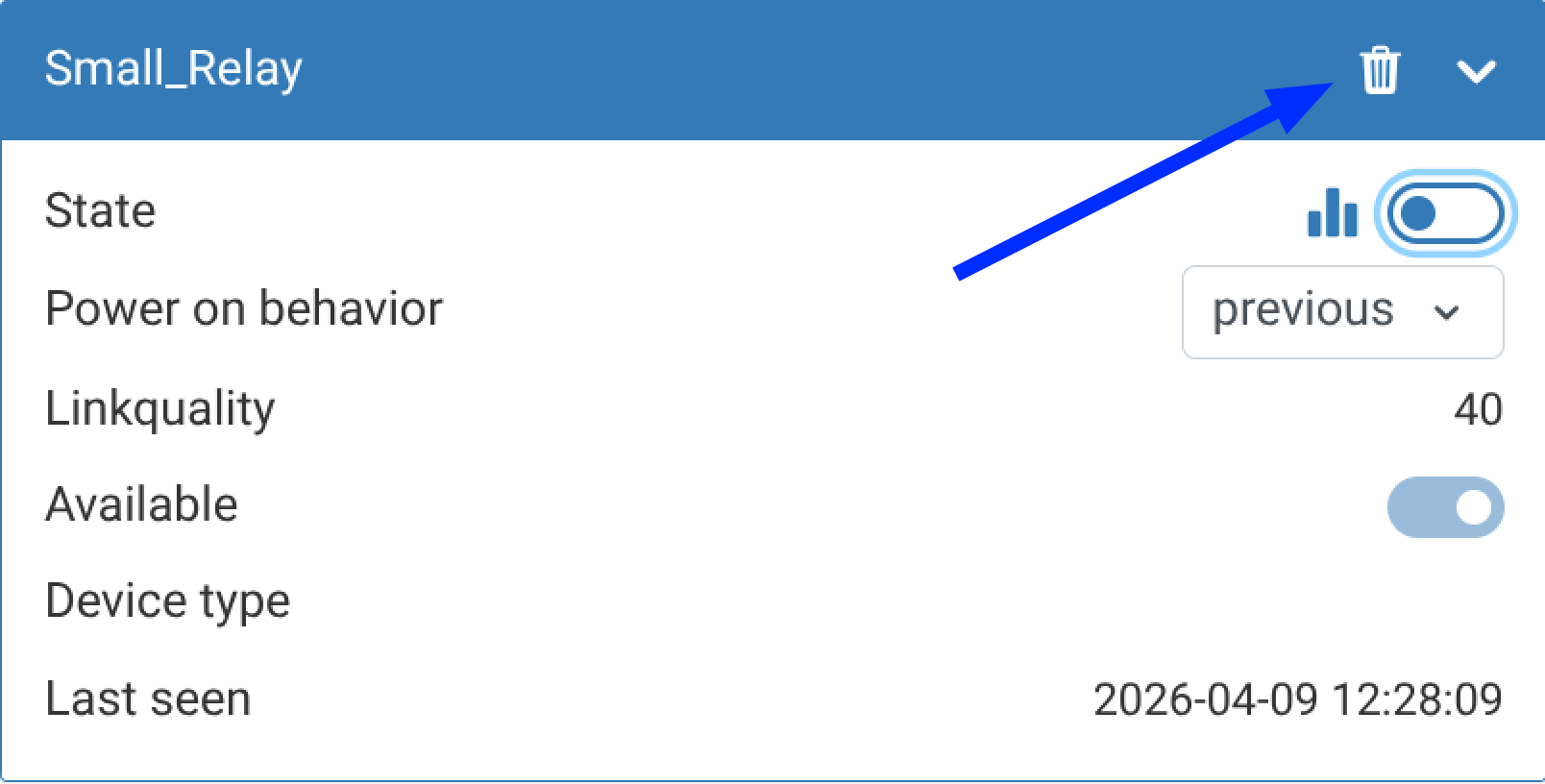 Removing a Zigbee device widget
Device channel translations
Available since release wb-2609 Zigbee device channel names are displayed in the selected web interface language.
Device model
Available since release wb-2609 For new devices, the model is now shown in the card title. Zigbee2MQTT devices also have a Model channel.
Troubleshooting
If zigbee2mqtt malfunctions, check the service status and detailed logs. To run commands, connect to the controller over SSH.
To view the current status and the latest log messages, run:
# systemctl status zigbee2mqtt
● zigbee2mqtt.service - zigbee2mqtt
   Loaded: loaded (/lib/systemd/system/zigbee2mqtt.service; enabled; vendor preset: enabled)
   Active: activating (auto-restart) (Result: exit-code) since Fri 2022-05-13 10:06:04 +04; 3s ago
  Process: 25986 ExecStart=/usr/bin/npm start (code=exited, status=1/FAILURE)
 Main PID: 25986 (code=exited, status=1/FAILURE)

May 13 10:06:04 wirenboard-AYXIHFQ6 systemd[1]: zigbee2mqtt.service: Main process exited, code=exited, status=1/FAILURE
May 13 10:06:04 wirenboard-AYXIHFQ6 systemd[1]: zigbee2mqtt.service: Unit entered failed state.
May 13 10:06:04 wirenboard-AYXIHFQ6 systemd[1]: zigbee2mqtt.service: Failed with result 'exit-code'.
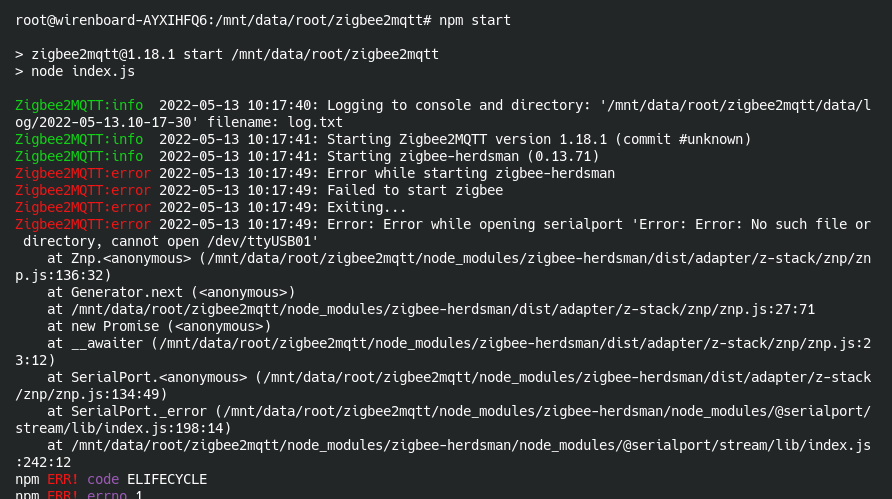
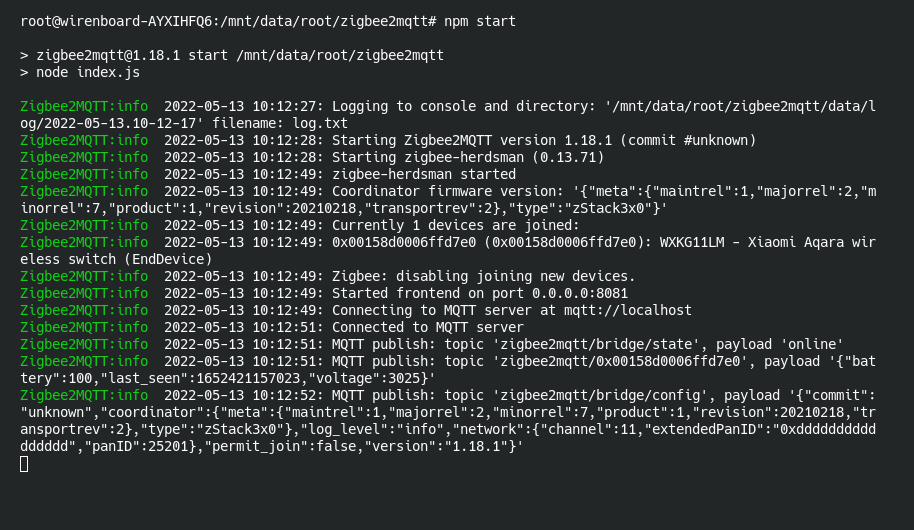
Often the previous step reveals a problem without identifying its cause. In that case, examine the logs:
- Stop the service:
systemctl stop zigbee2mqtt
- Go to the zigbee2mqtt directory:
cd /mnt/data/root/zigbee2mqtt/
- Start zigbee2mqtt manually, printing all messages to the console, with
npm start:# npm start > zigbee2mqtt@1.18.1 start /mnt/data/root/zigbee2mqtt > node index.js Zigbee2MQTT:info 2022-05-13 09:59:30: Logging to console and directory: '/mnt/data/root/zigbee2mqtt/data/log/2022-05-13.09-59-19' filename: log.txt Zigbee2MQTT:info 2022-05-13 09:59:30: Starting Zigbee2MQTT version 1.18.1 (commit #unknown) Zigbee2MQTT:info 2022-05-13 09:59:30: Starting zigbee-herdsman (0.13.71) Zigbee2MQTT:error 2022-05-13 09:59:39: Error while starting zigbee-herdsman Zigbee2MQTT:error 2022-05-13 09:59:39: Failed to start zigbee Zigbee2MQTT:error 2022-05-13 09:59:39: Exiting... Zigbee2MQTT:error 2022-05-13 09:59:39: Error: Error while opening serialport 'Error: Error: No such file or directory, cannot open /dev/ttyUSB01' at Znp.<anonymous> (/mnt/data/root/zigbee2mqtt/node_modules/zigbee-herdsman/dist/adapter/z-stack/znp/znp.js:136:32) at Generator.next (<anonymous>) at /mnt/data/root/zigbee2mqtt/node_modules/zigbee-herdsman/dist/adapter/z-stack/znp/znp.js:27:71 at new Promise (<anonymous>) at __awaiter (/mnt/data/root/zigbee2mqtt/node_modules/zigbee-herdsman/dist/adapter/z-stack/znp/znp.js:23:12) at SerialPort.<anonymous> (/mnt/data/root/zigbee2mqtt/node_modules/zigbee-herdsman/dist/adapter/z-stack/znp/znp.js:134:49) at SerialPort._error (/mnt/data/root/zigbee2mqtt/node_modules/zigbee-herdsman/node_modules/@serialport/stream/lib/index.js:198:14) at /mnt/data/root/zigbee2mqtt/node_modules/zigbee-herdsman/node_modules/@serialport/stream/lib/index.js:242:12 npm ERR! code ELIFECYCLE npm ERR! errno 1 npm ERR! zigbee2mqtt@1.18.1 start: `node index.js` npm ERR! Exit status 1 npm ERR! npm ERR! Failed at the zigbee2mqtt@1.18.1 start script. npm ERR! This is probably not a problem with npm. There is likely additional logging output above. npm ERR! A complete log of this run can be found in: npm ERR! /root/.npm/_logs/2022-05-13T05_59_39_596Z-debug.log
- Here, it is immediately clear that the configured port is incorrect.
- After identifying and fixing the problem, start the service again:
systemctl start zigbee2mqtt
If running npm start automatically starts the service successfully, stop it by pressing Ctrl+C.
Sometimes automatic service startup needs to be disabled. Use these commands to control it:
systemctl disable zigbee2mqtt
systemctl enable zigbee2mqtt
Resolving problems
Version 1.18.1 does not start after an update
The console shows:
Zigbee2MQTT version 1.18.1. Does not accept version node. Zigbee2MQTT requires node version ^10  ^12  ^14 |
| ^15 || ^16, you are running v20.5.1!
Install the previous nodejs package version:
apt install nodejs=16.20.2-deb-1nodesource1
zigbee2mqtt reports a module error
Determine whether the problem is in zigbee2mqtt, its configuration or the module.
First, check that the module is configured correctly; see the expansion module documentation.
If the configuration is correct, test the module with the third-party script check-cc2652p:
- Download the script following the repository instructions.
- Stop zigbee2mqtt:
systemctl stop zigbee2mqtt
- Run the command, replacing the port with your own:
python3 ./check_cc2652p.py /dev/ttyMOD4
If the response contains firmware and module version information, the module works. The problem is therefore in zigbee2mqtt: an incorrect port or another failure.
Example of successful output:
# python3 ./check_cc2652p.py /dev/ttyMOD4
SYS Version response detected for CC2652:
Transport Version: 2
Product ID: 1 — CC2652 Zigbee Module.
Major Release: 2
Minor Release: 7
Maintenance Release: 1
Stack Version: 2.7.1 — Indicates Z-Stack compatibility.
Revision: 6bb1340100 — Firmware Revision Details.
Additional asynchronous data detected. Skipping:
Raw data: 81fe0345c4f2dd00ad
Problem updating zigbee2mqtt to version 2.1.1
If zigbee2mqtt does not start after updating to version 2.1.1, with the following symptoms:
> zigbee2mqtt@2.1.1 start
> node index.js
node:internal/modules/cjs/loader:1051
  throw err;
  ^
Error: Cannot find module 'semver'
Require stack:
- /mnt/data/root/zigbee2mqtt/index.js
at Module._resolveFilename (node:internal/modules/cjs/loader:1048:15)
try the following steps:
- Back up the file
configuration.yaml. - Remove the current version:
apt remove zigbee2mqtt. - In the file
configuration.yamladd the adapter typeadapterto the sectionserial. Example for our module:serial: port: /dev/ttyMOD1 adapter: zstack
- Reinstall the package:
apt update && apt install zigbee2mqtt.
Configuration file accidentally replaced when updating zigbee2mqtt to 2.1.1
When updating zigbee2mqtt to 2.1.1 from an earlier version, the system asks whether to install a new configuration file or keep the old one:
File configuration «/mnt/data/root/zigbee2mqtt/data/configuration.yaml»
 ==> Modified s since installation (by you or by a script).
 ==> The author of the package has supplied an updated version.
  What should be done? The following options are available:
   Y or I : install the version provided by the maintainer of the package
   N or O : keep the installed at the current time version
      D    : show the differences between the versions
      Z    : start a shell command line to inspect the situation
 By default the system keeps the current version file configuration. *** configuration.yaml (Y/I/N/O/D/Z) [by default N] ? y
If you accidentally chose to replace the file and zigbee2mqtt fails to start with an error like this:
zh:adapter:zstack:manager: Configuration is not consistent with adapter state/backup!
zh:adapter:zstack:manager: - PAN ID: configured=43787, adapter=47905
zh:adapter:zstack:manager: - Extended PAN ID: configured=00124b0030d540fa, adapter=00124b0030d540fa
zh:adapter:zstack:manager: - Network Key: configured=d9bf90f96d74b793c1f136ecee3660cf, adapter=ab64f03813fd7cc36c6f3383b7d58ad9
zh:adapter:zstack:manager: - Channel List: configured=11, adapter=11
zh:adapter:zstack:manager: Please update configuration to prevent further issues.
zh:adapter:zstack:manager: If you wish to re-commission your network, please remove coordinator backup at /mnt/data/root/zigbee2mqtt/data/coordinator_backup.json.
zh:adapter:zstack:manager: Re-commissioning your network will require re-pairing of all devices!
z2m: Error while starting zigbee-herdsman
z2m: Failed to start zigbee-herdsman
restore startup and the deleted configuration as follows:
- Do not delete the file
~/zigbee2mqtt/data/coordinator_backup.json. Deleting it will require pairing all devices again. - Stop the service with
systemctl stop zigbee2mqtt. - Back up the existing configuration:
cp ~/zigbee2mqtt/data/configuration.yaml ~/zigbee2mqtt/data/configuration.yaml-wb-backup
- Restore the previous configuration:
cp ~/zigbee2mqtt/data/configuration.yaml.dpkg-old ~/zigbee2mqtt/data/configuration.yaml
- Check that the file specifies the adapter type: it must contain the line
adapter: zstack. If missing, add it to the sectionserial. - Restart the service with
systemctl restart zigbee2mqtt.
zigbee2mqtt should start using the configuration that existed before the update.
Archive of all versions (Pool)
This contains all z2m packages, both testing and release builds. It also provides publication dates, which the normal repository does not show. These help establish when a bug or feature entered the system.
History of a specific version (e.g. 2.1.1)
Purpose: incident investigation and finding the release date of a particular build.
Official release (Packages)
This is the approved list of packages a controller (for example, WB7) sees through apt update. A package is included only after testing and official release registration (for example, branch 2507).
Purpose: checking which z2m version is available for a clean installation or update on a user's controller.
Legacy converter
- wb-zigbee2mqtt
Useful links
- zigbee2mqtt documentation
- Using Zigbee devices through Zigbee2mqtt and Node-RED
- Connecting Zigbee devices to a Wiren Board controller and writing wb-rules scripts
- Building zigbee2mqtt from source
- Local OTA firmware updates through zigbee2mqtt